
While submitting a ticket you are required to fill in a form and providing all the necessary information will speed up a lot the resolution process.
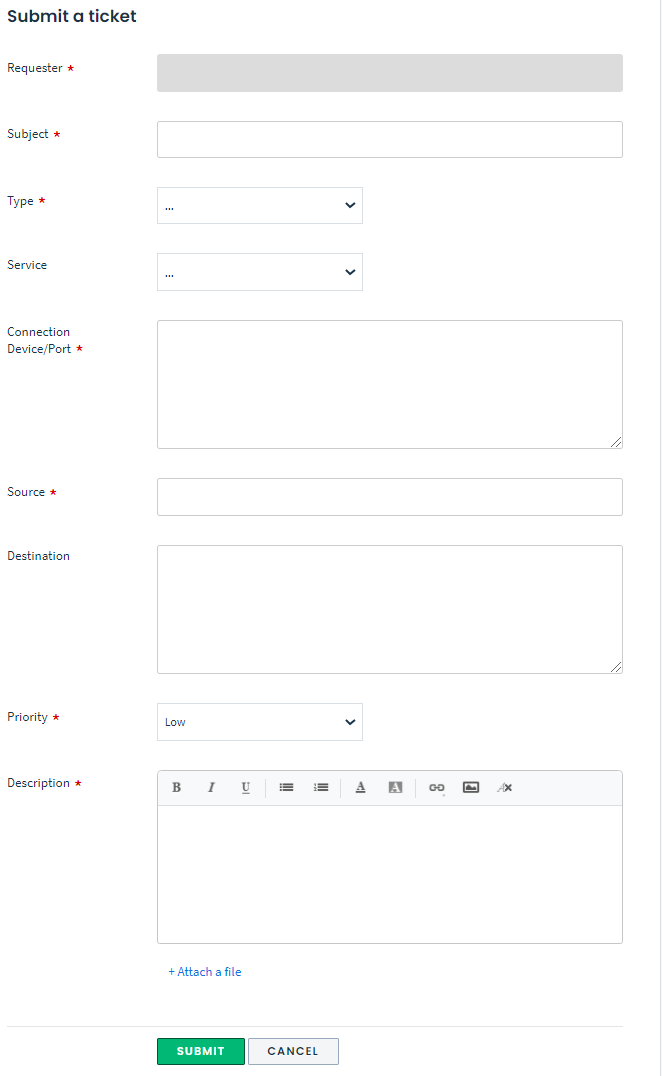
Here is a small guide on what information should be provided in each field:
- Subject - Briefly describe the ticket.
- Type - Selected from the drop down menu, based on the ticket type different information should be provided.
- Packet Loss - In case there are packet loss to one/multiple destinations, this type should be selected. If it is selected, please attach screenshots with ping statistics(at least 100 ICMP packets), traceroute and MTR to the destination showing packet loss.
- High Latency - In case there is high latency to a specific resource/IP, please attach screenshots with ping statistics(at least 100 ICMP packets), traceroute and MTR to the destination/destinations showing high latency.
- Interruptions - In case there are interruptions, please attach screenshots with ping statistics(at least 100 ICMP packets), traceroute and MTR.
- Not working - In case there is a service, that is not working, please input in the description field(most bottom field) as much information as you can, for example, when it was noticed, when last time it was working, what changes have been done recently, how this service was working before, what Layer2/Layer3 information is available for that service, ping to different resources, ping to gateway etc...
- New Service - In case there is a new service that should be deployed, usually HLD(high level design) of the new service should be discussed in advance. While creating a new ticket, all information required for configuration of the new service should be provided and before submitting this ticket, a representative from Support Team should be aware of this, and should approve it. Otherwise ticket will be set to pending until it will be agreed with Support Team.
- Maintenance - This ticket type should be choosen when there is a planned maintenance like hardware upgrade, capacity upgrade, re-design, integration of new device, replacement of an old device, customer's circuit maintenance, customer's service review and optimization, network optimization or any other project/task that is related to any kind of Operations Tasks.
- Service - Customer's service should be selected, if it is missing from the drop down menu, choose the one that is most related to the service or input in the description field(most bottom field) service information.
- Connection Device/Port - Please input the information about the Device and Port where affected service is connected. For example if it is a customer that is experiecing any kind of issues, then, input here information about the Switch/Router and Port where this customer is connected. If this is a new service/circuit/device that should be deployed, please input the Device and Port where it will be conected. If it is anything else, please input the most related Device and Port.
- Source - This field should be used to input the Source IP address related to the ticket. If it is a customer experiecing any issues, please specify customer's IP. If it is related to multiple customers having different IPs, please input 1 IP here, and the rest in the description field(most bottom field). If it is a VPN or Point-to-Point customer, you can input here any of the customer's points.
- Destination - This field should be used to input the Destionation Resource/Ip related to the ticket. If it is a customer experiecing any issues, please specify the destination IP or resource he is experiecing issues. If it is a VPN or Point-to-Point cusotmer, you can input here any of the customer's points. If it is not related to the ticket please leave blank.
- Priority - Here you should select the priority of the ticket. Usually this field is agreed in advance, and reflect the time, taken by the Support Team to process, and provide a feedback/resolution on the ticket.
- Description - Any information related to the ticket should be provided here. Please keep in mind that the more information related to the ticket will be added here, the faster the resolution will be done. Here is a free form text, where Layer1 - Layer7 infromation should be provided as well as any other information related to the ticket.